
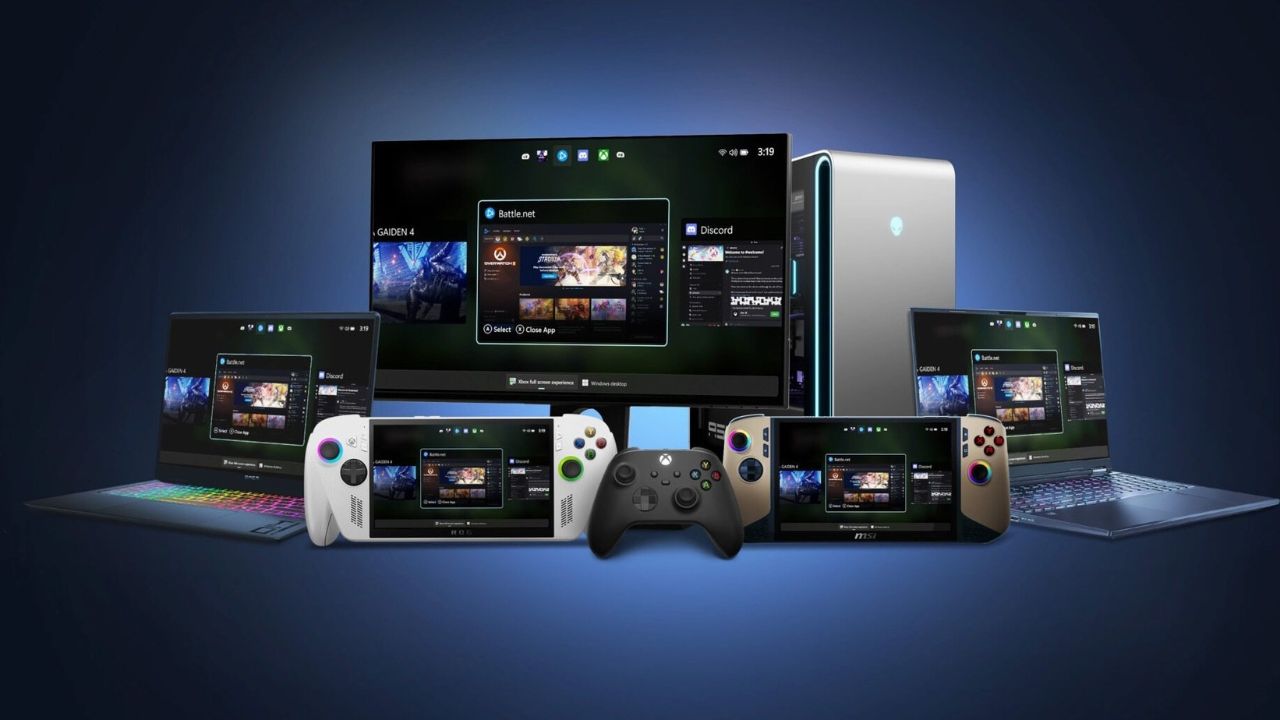
The definition of Xbox is evolving rapidly. What once started as a console ecosystem is now expanding across devices, and Microsoft’s latest move proves it. With the introduction of Xbox Mode on Windows 11, the company is transforming ordinary PCs into console-like gaming machines.
This is not just a small feature update. It represents a shift in how Microsoft wants users to experience gaming, regardless of the device they own.
What Is Xbox Mode on Windows 11
Xbox Mode is a new interface designed specifically for gaming. When enabled, it replaces the traditional Windows desktop with a full-screen, controller-friendly environment that feels similar to using an Xbox console.
Instead of navigating through folders, apps, and system menus, users can jump straight into their games. The interface is simplified, focused, and built entirely around ease of use.
The goal is clear. Microsoft wants to eliminate the friction between turning on your PC and starting a game.
A Console-Like Experience on Any PC
One of the most important aspects of Xbox Mode is how closely it mirrors a console experience. Everything is designed for quick access and smooth navigation.
Your game library appears in one place, bringing together titles from different platforms. Whether you are using Game Pass, Steam, or other launchers, the system aims to unify them under a single interface.
This makes the experience feel less like managing a computer and more like using a dedicated gaming system.
Built Around Controller Navigation
Unlike the traditional Windows setup, Xbox Mode is built with controllers in mind. You do not need a keyboard or mouse to move around the interface.
Menus, settings, and game selections are all optimized for controller input. This is especially useful for players who connect their PCs to TVs or prefer a relaxed, couch-style gaming setup.
It effectively removes the complexity that often comes with PC gaming and replaces it with a more accessible approach.
Focused Gaming Without Distractions
Another key benefit of Xbox Mode is its ability to reduce distractions.
When you switch into this mode, Windows minimizes background processes and unnecessary notifications. The idea is to create a cleaner environment where your attention stays on the game.
While this does not significantly boost hardware performance, it improves the overall experience by making gaming feel more immersive and less interrupted.
Not About Power, But Simplicity
It is important to understand that Xbox Mode is not designed to increase frame rates or improve graphical performance.
Instead, its purpose is to simplify how users interact with their games. It removes the clutter of a traditional desktop and replaces it with a streamlined interface focused entirely on gaming.
For many users, especially casual players, this kind of usability improvement can be just as valuable as raw performance gains.
Why Microsoft Is Expanding Xbox
This move is part of a much larger strategy.
Microsoft is no longer treating Xbox as just a console. Instead, it is building a gaming platform that works across multiple environments, including PCs, cloud services, and potentially handheld devices.
By bringing a console-like interface to Windows, Microsoft is making sure that the Xbox experience feels consistent no matter where you play.
This approach allows users to move between devices without having to adjust to completely different systems.
A Step Toward the Future of Gaming
Xbox Mode also hints at where gaming is heading in the future.
The lines between console and PC are slowly disappearing. Features like this show how Microsoft is preparing for a hybrid ecosystem where hardware matters less than the experience itself.
In the future, players may not need to choose between a console and a PC. Instead, they will have a unified system that adapts to different devices and use cases.
Early Impressions From Users
Initial reactions to Xbox Mode have been mixed, but overall positive.
Some users appreciate the simplicity and the ability to turn their PC into a console-like system. It makes gaming more accessible and comfortable, especially for those who prefer using a controller.
Others feel that it is unnecessary, particularly for advanced users who prefer traditional PC setups with full control.
However, the key advantage is flexibility. Xbox Mode is optional, so users can switch between the standard desktop and the gaming interface whenever they want.
What This Means for Gamers
For gamers, this update brings more choice and convenience.
You can use your PC in a traditional way when needed, and switch to a console-style experience when you want to focus purely on gaming. This flexibility is one of the biggest strengths of the feature.
It also lowers the barrier for new users who may find PC gaming complicated.
Final Thoughts
Xbox Mode on Windows 11 is a clear sign that Microsoft is rethinking what gaming should look like.
Instead of focusing only on hardware, the company is prioritizing user experience and accessibility. By turning PCs into console-like systems, it is making gaming more flexible and more unified.
This is not just about adding a feature. It is about redefining how people interact with games.
As Microsoft continues to expand the Xbox ecosystem, one thing becomes clear. Gaming is no longer tied to a single device. It is becoming an experience that follows you wherever you play.
The post Xbox Mode on Windows 11: Microsoft Turns Your PC Into a Full Gaming Console appeared first on trendblog.net.